Results
The Result panel opens on the right when you select a room, and fills in once the simulation finishes.
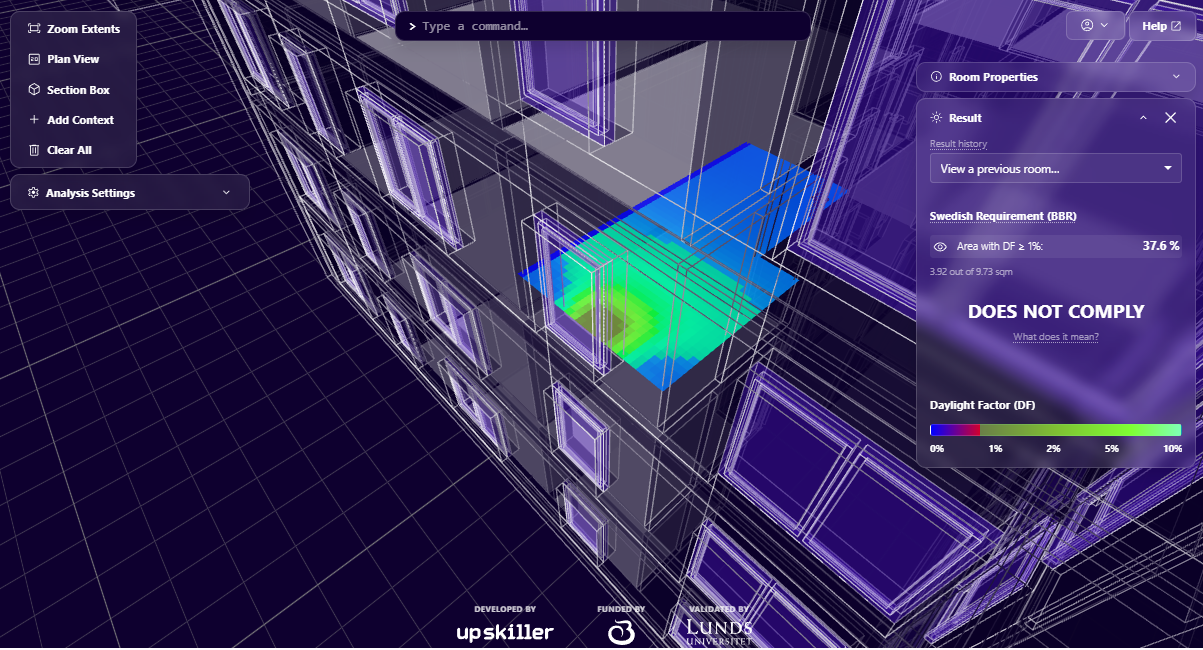
- Daylight Factor (DF) heatmap on the room floor. Blue = 0%, red at 1–2%, green/white at 5–10%+.
- Area with DF ≥ 1%: share of the floor that meets the threshold, shown as a percentage and in m² (e.g. 3.92 out of 9.73 m²).
- Compliance status against the Swedish daylight regulation (BFS 2024:8): COMPLIES when DF ≥ 1% over more than 50% of the room area, otherwise DOES NOT COMPLY. See Daylight Metrics for the full definition.
- Result history: reopen the result for a previously analysed room.
Per-apartment assessment (residential)
Analysis is per room. For residential buildings the regulation requires the assessment to be made per apartment: evaluate each vistelserum in the apartment and sum their compliant areas to determine whether the apartment as a whole meets the threshold.
The assumptions behind the result — daylight standard, reflectances, glass transmittance — are set in Analysis Settings.