- Open dfifc.upskiller.xyz in your browser
- Drag and drop an
.ifc file onto the drop zone, or click it to open a file picker
- Wait for the model to load. This can take from a few seconds to a few minutes, depending on the model size.
- (Optional) Click "Add Context" to load additional IFC files for surrounding buildings
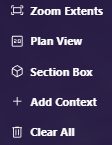
| Button | Action |
|---|
| Zoom Extents | Fit the whole model in view |
| Plan View | Switch to a top-down view |
| Section Box | Clip the model to a box to see inside |
| Add Context | Load additional IFC files for surrounding buildings |
| Clear All | Remove all models and reset the scene |
The Analysis Settings panel below the toolbar is covered in Analysis Settings.
Camera Controls
| Action | Control |
|---|
| Zoom in/out | Mouse scroll wheel |
| Rotate view | Right-click + drag |
| Pan view | Middle-click + drag |
| Reset view | Click Zoom Extents |